LittleDef (fem1) v3
Lightweight 2D Frame Structural Analysis for Unix & Windows
Overview
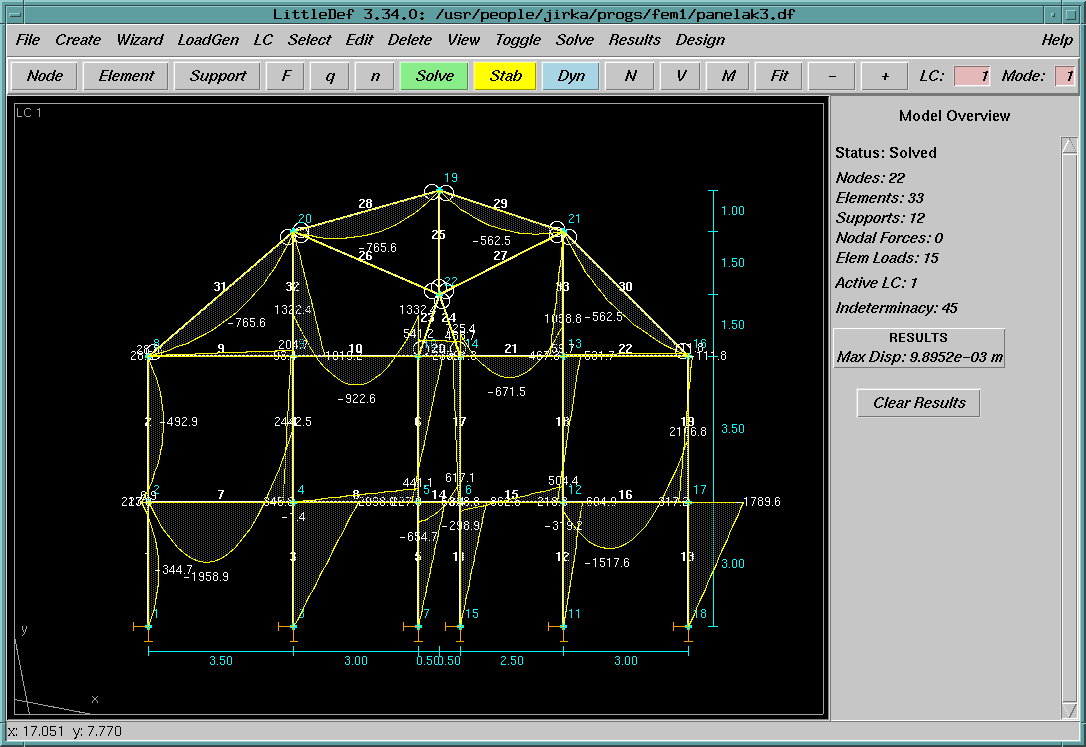
LittleDef is a portable, fairly fast, and relatively feature-rich 2D Finite Element Method (FEM) application for frames and beams (1D elements on;y). Originally designed for SGI IRIX workstations. It specializes in structural engineering, offering Eurocode-compliant verification for steel, concrete, timber, and masonry. Please note that the Eurocode part is now for reference only and it is incomplete. Anyway, 2nd generation Eurocedo preview desing tools are available, too (albeit they are more limited that current Eurocode support).`
Key Features
- Analysis Types: Linear Static, P-Delta (2nd order), Large Deformations, Newton-Raphson for elastic-plastic problems. Modal (Frequencies), Seismic (Response Spectrum), a nd Elastic Stability (Buckling).
- Eurocode Design: Integrated verification modules for EN 1990 (Combinations), EN 1992 (Concrete), EN 1993 (Steel), EN 1995 (Timber), and EN 1996 (Masonry).
- High Performance: Sparse matrix assembly and solver, with an optional ANSI89 C accelerator for heavy computations.
- FEPro 3D Extension: Includes the FEPro sructured mesher, 3D visualizer, and nonlinear solver for shell and solid elements with OpenGL rendering, J2 plasticity, and 3D STL/DXF export.
- Portable: Pure Tcl/Tk 8.0+ codebase. Runs on IRIX, Linux, BSD, and Windows The ANSI90 C-compiant accelerator library can be built (tested on the Linux and the IRIX 6.5) automaticaly loaded by the Tcl prorgam.
- Workflow: Native IRIX Interactive Desktop integration (FTR), CLI mode for headless reporting, and export to LaTeX, Markdown, EPS, XFIG, and CSV.
Requirements
LittleDef requires a Tcl/Tk interpreter version 8.0 or newer. You can find more information and downloads at the official Tcl/Tk website.
- Windows: We recommend the Magicsplat Tcl/Tk installer.
- Linux: Install using your package manager (e.g.,
sudo apt install tkon Debian/Ubuntu).
Usage
- Launch the GUI using
wish fem1.tcl- Run a headless analysis:
wish fem1.tcl --solve model.df- Run a text-only interfece:
- wish fem1.tcl --cli
- tclsh fem1.tcl
- Run a headless analysis:
Text-only interface
The text-only interface ncludes only subset of LittleDef features (no EC check are accessible from here, for example) but it can work remotely and over slow lines. The GUI version includes option to save and load command from thos interface.
Moreover, it can plot graphics on Tektronix-compatible terminals (on the XTerm: xterm -t). White graphical representation is somewhat limited limited it is still helful if no other option is available. It the worst case it is possible to use ASCI text-based graphics (it's more an ASCII art than the actual graphics, though).
=========================================================================== LittleDef Retro CLI Command Reference =========================================================================== n x y [i] Create node at (x,y) or update node i nl List all nodes and supports nd i Delete node i ml List available material library sl [mat] List available section profiles (optional filter mat) ee m s Set default element properties (material m, section s) e n1 n2 [[h1] h2] Create/modify element between nodes n1 and n2 e j n1 n2 ... Create/modify element j between nodes n1 and n2 el List all elements q i q1 q2 Set transverse load on element i (start q1, end q2) qn i q1 q2 Set axial load on element i (start q1, end q2) ql / qnl List transverse or axial element loads qg i / qng i Delete transverse or axial load on element i f i dir val Set force on node i (dir = X, Y, Z/M) fl List all point forces fd i dir Delete force on node i in direction dir d i dir [val] Set support/prescribed displacement on node i dl List all supports dd i dir Delete support on node i lc [name] Set or create active load case (lc add name / lc name) lcl List defined load cases and load combinations comb add c lc1 f1 ... Define load combination c sol [type] Solve (type: linear, buckling, pdelta, plastic, modal) gp Plot model geometry to Tektronix terminal ap [mode] Plot ASCII text art model geometry to plain terminal rp Plot support reactions to Tektronix terminal rl [fname] List reactions (optional save to fname) rnl [i] [fname] List normal forces (all or detailed for element i) rvl [i] [fname] List shear forces (all or detailed for element i) rml [i] [fname] List bending moments (all or detailed for element i) rdl [i] [fname] List deformations (all or detailed for element i) rnp [i] Plot normal forces on Tektronix terminal rvp [i] Plot shear forces on Tektronix terminal rmp [i] Plot bending moments on Tektronix terminal rdp [i] Plot deformations on Tektronix terminal batch fname Execute commands from script file fname wiz [type] Wizard generator (wiz truss pratt|howe|warren or wiz frame) report [fname] Print or save full text analysis report open fname Open model file (.df) save fname Save model file (.df) history / hi List command history (!n, !prefix, !! to re-execute) help [cmd] Display general or command-specific help quit / exit Exit program =========================================================================== Type 'help' (e.g. 'help n', 'help sol', 'help e') for command details.